Request a demo

NAV Oversight

Fund data you can trust, from any administrator.

Quantium NAV Oversight turns administrator data into one verified set of fund and investor numbers that Finance can use and sign off. It works however the data arrives: Excel, PDF, API or your data warehouse.

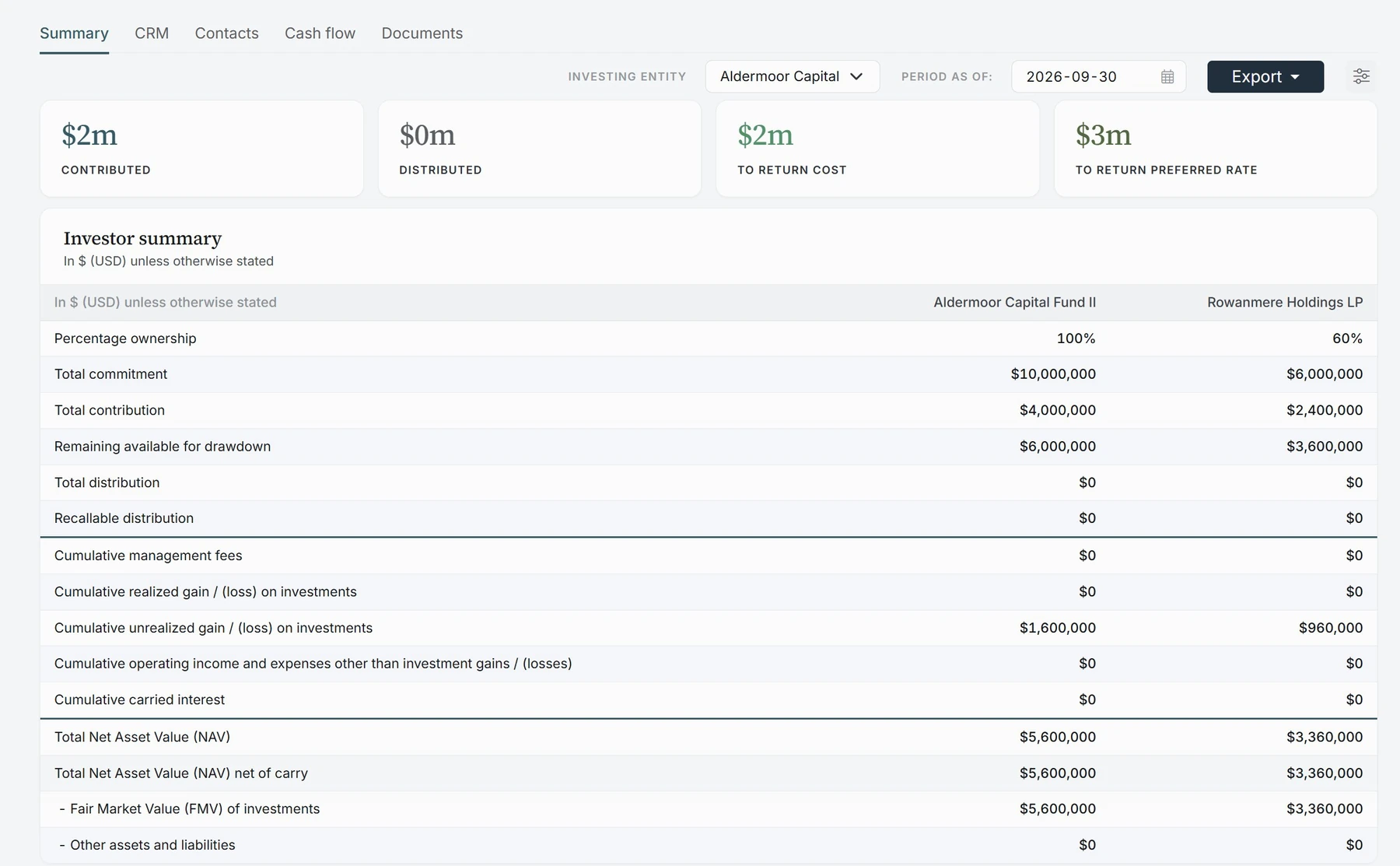
Quantium CORE investor summary: fund-level figures for a fund at 100% beside one investor's 60% share, from commitment and contributions through unrealized gains to total NAV and NAV net of carry
9 of 10of the top 10 fund administrators work with Quantium clients
$100bn+of fund assets on the Quantium platform
One enginethe same accounting engine that runs full fund accounting
SOC 2Type II

The problem

Having the data is not the same as having the numbers.

The data may already be in Excel packs, an API feed or a data warehouse. Finance still cannot work with it directly. NAV, IRR, fees and carry get rebuilt in spreadsheets, and the same figure ends up in three versions. Nobody has verified the numbers before they are used.

Where it fits

Two ways to use NAV Oversight

Most firms start with one. Larger firms use both.

See NAV Oversight in action

01Use case

Use the administrator data you already trust

Your administrator's fund-level numbers are reliable, and you have no reason to replicate them. What is missing is the structure around them: how funds, feeders, parallel vehicles, co-investments and investor groups fit together. Without it, every cross-fund total, interim IRR or LP question becomes another spreadsheet.

SourceAdministrator fund-level data
QuantiumAdd the structure
OutputCross-fund views, interim IRR, LP reports

What Quantium does

Adds that structure on top of the administrator's figures, linking funds, feeders, parallel vehicles, co-investments and investor groups in one model. Cross-fund totals, interim NAV and IRR, and LP reports then come straight from it.

Finance answers from one set of numbers, without rebuilding them.
02Use case

Check the numbers before you approve them

Several administrators, each with its own templates, account names and investor IDs. Before NAV, fees or capital accounts go to LPs, Finance wants to check them against source.

SourcePacks from each administrator
QuantiumCheck and sign off
OutputApproved figures to reports and AI

What Quantium does

Brings every administrator's pack and GL into one data model and checks NAV, fees and capital accounts against source. You set how deep each check goes, from the headline figures to every investor line. Finance's sign-off is recorded by fund and period.

Only figures Finance has approved reach LP reports.

Benefits

What Finance can do once the data is clean

Each of these runs on the same verified fund and investor data.

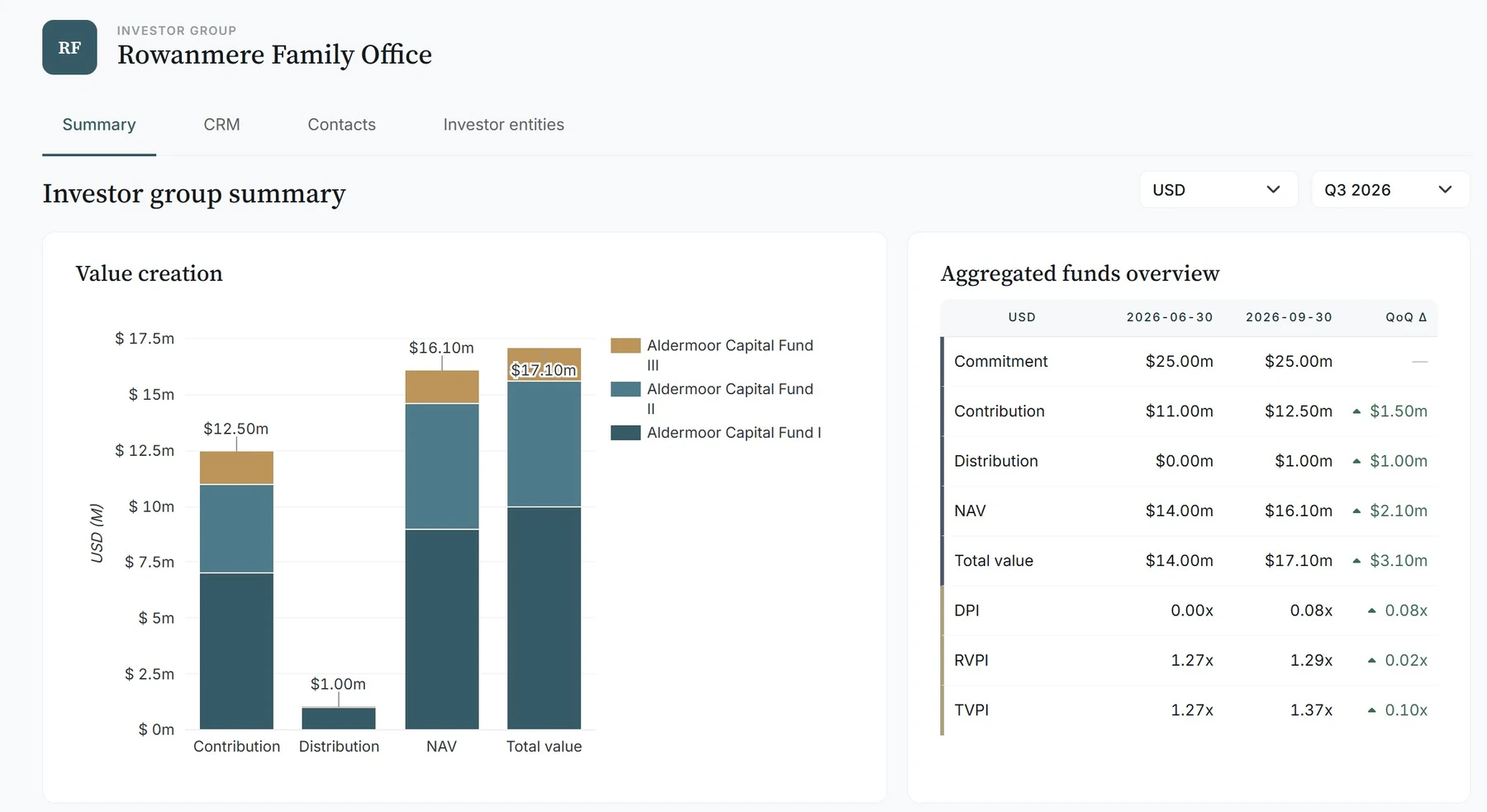
Cross-fund aggregation in Quantium CORE

01

Cross-fund aggregation

Commitments, NAV and returns totaled across funds, vehicles, co-investments and investor groups.

Fund II · interimUSD · as of 15 Nov 2026
NAV, 30 Sep 2026445,936,000
Capital call #8, 20 Oct32,500,000
Distribution #10, 5 Nov(12,000,000)
Interim NAV, 15 Nov 2026466,436,000
Net IRR, 15 Nov 202612.7%

02

Interim NAV and performance

NAV and IRR at any date between statements, updated for capital calls and distributions since the last one.

Management fees · Q3 2026USD · per LPA terms
FundQuantiumAdmin.
Fund I1,890,0001,890,000Agreed
Fund II2,412,5002,412,500Agreed
Co-Invest312,000318,400Review

03

Calculate and verify fees

Management fees calculated from LPA terms and compared with the administrator's figures.

Waterfall and carry management in Quantium CORE

04

Waterfall and carry management

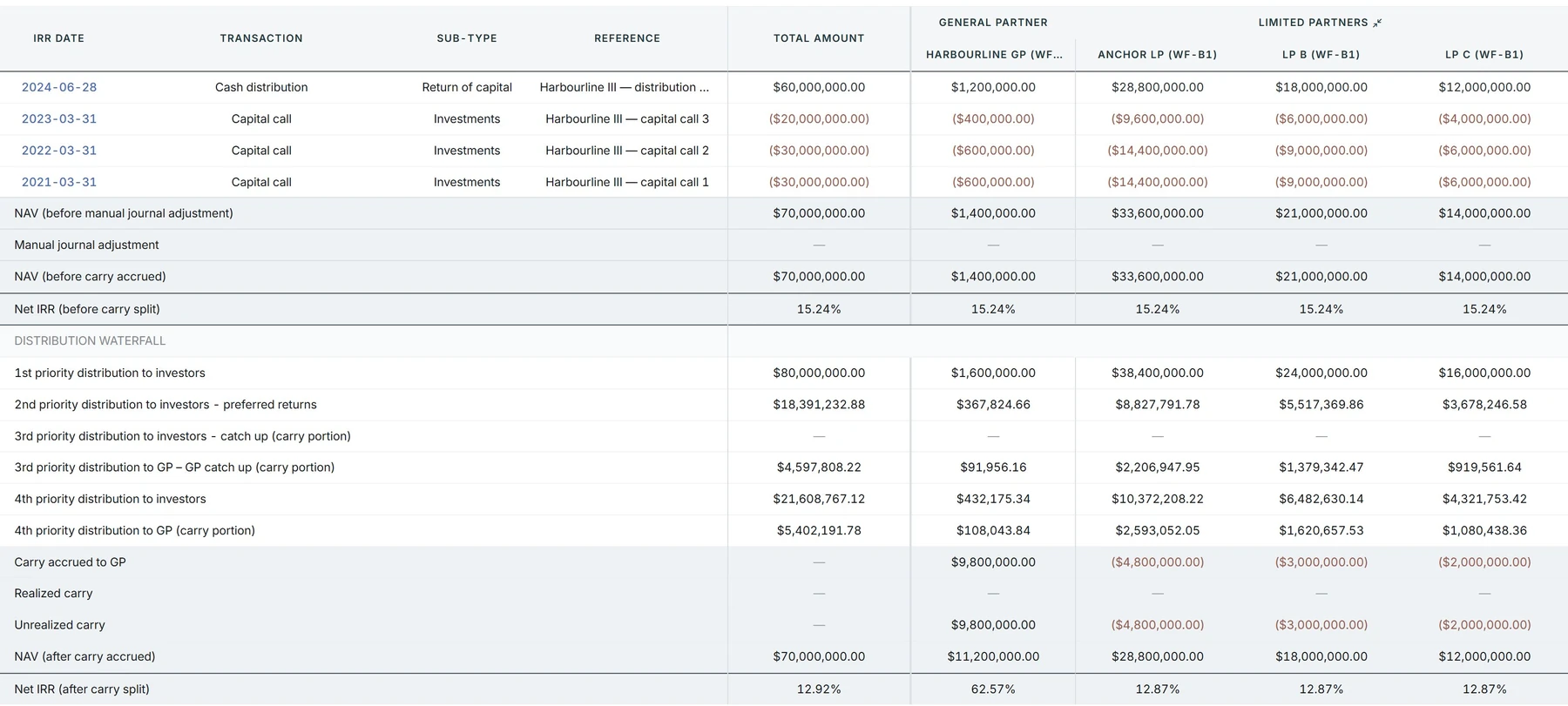
Run each distribution through the waterfall. Track carry accrued, realized and unrealized, and every LP's share.

Dashboards and BI in Quantium CORE

05

Dashboards and BI

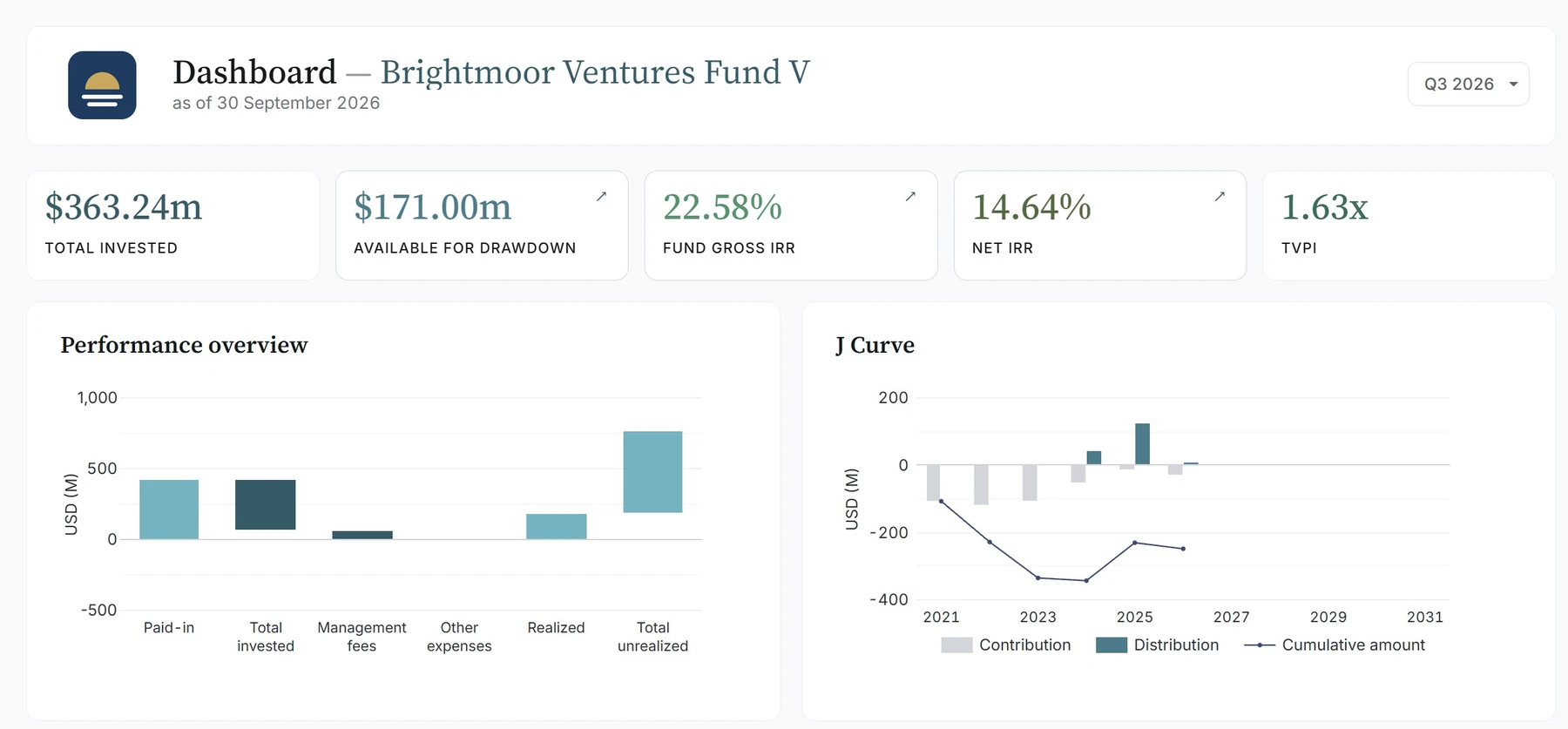
Fund dashboards in Quantium, or feed your BI tools through Excel, API or a data warehouse.

Fund II dataShared within permissions
  • IRInvestor relationsLP reporting and portalRead only
  • DTDeal teamFund summary and assetsRead only
  • XLExcelFormula-linked exportExport
  • AIClaude · ChatGPTThrough the MCP ServerRead only

06

Share data across teams

IR, deal and finance teams get the figures they need, within their permissions.

Run reporting in Quantium CORE

07

Run reporting

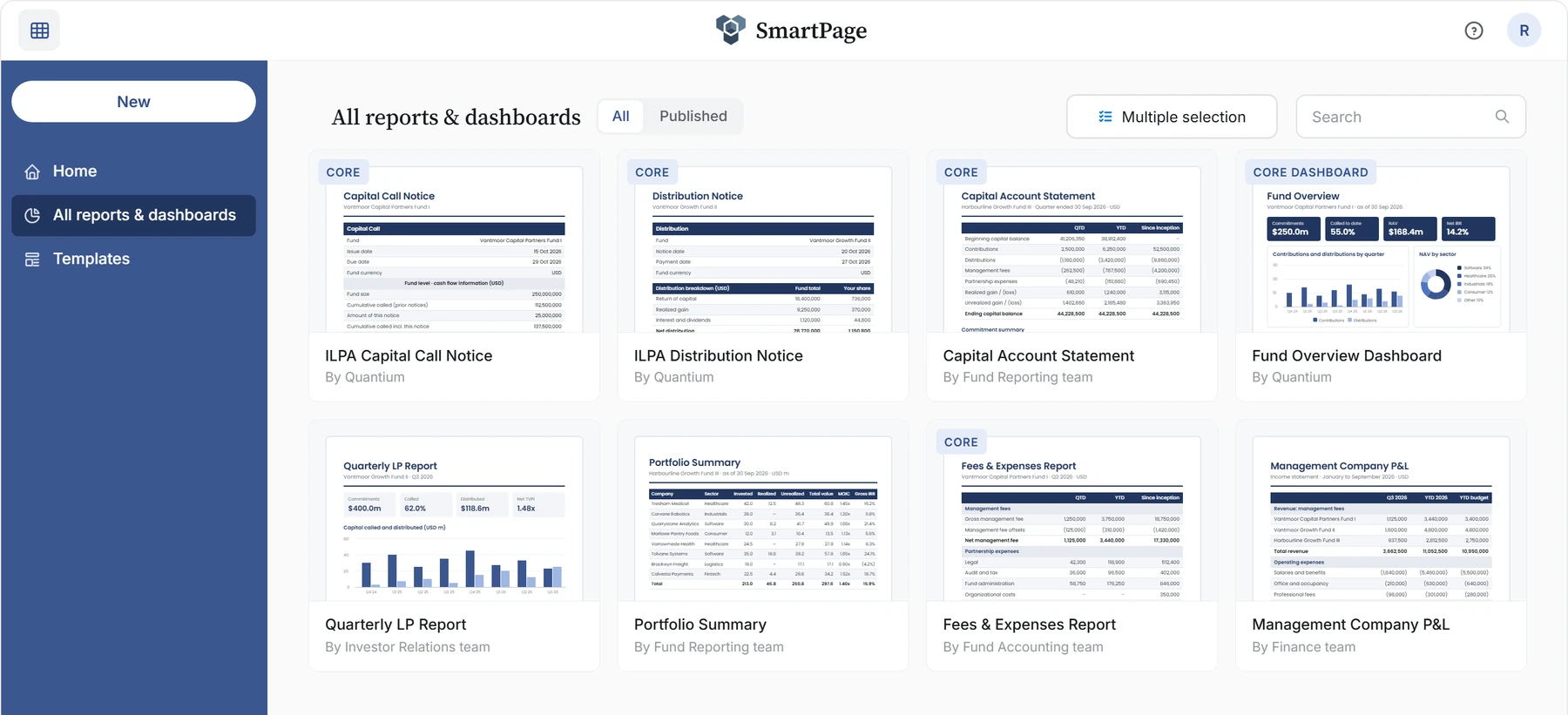
Capital account statements, notices and quarterly LP reports from the same numbers, in SmartPage.

Who still owes on Call #3?

CORE AI

2 of 6 LPs, 3.3m outstanding on Call #3 (15 Sep 2026):

Ardenvale Teachers' RetirementOverdue2,100,000
Hartwell Family OfficePartially paid1,200,000

SourcesQuantium data 6 records

08

Ask questions, get cited answers

Ask CORE AI in plain English. Answers come from the approved figures and cite every record, in Quantium or in Claude and ChatGPT.

How it works

From the systems you already use, to numbers you can sign.

No new administrator and no rip-and-replace. Quantium connects to what you have, organizes it, checks it and hands it on.

Your existing sources

  • Your fund accounting system
  • Excel and PDF packs from any administrator
  • General ledger extracts
  • API feeds
  • Your data warehouse

Quantium

One fund and investor data model

  1. 01Mapto your funds, vehicles and investors
  2. 02Verifyagainst each administrator's source
  3. 03Calculateinvestor balances, IRR, fees and carry on the accounting engine
  4. 04Sign offby fund and period, with an audit trail

Where the numbers go

  • LP reporting and the investor portal
  • Dashboards and BI
  • Excel, formula-linked
  • API and your data warehouse
  • Claude and ChatGPT, through MCP

Expertise

An accounting engine, not a dashboard.

A dashboard shows the numbers it is given. Quantium understands how your funds, vehicles and investors fit together, down to each LP's share. So it can calculate fees, IRR and carry from the underlying data, and check them against what your administrator reported.

01

Accounting-grade calculations

Investor allocations, IRR, fees, carry and waterfalls are calculated on the same engine that runs full fund accounting for Quantium clients. Not in spreadsheets, and not by a language model.

02

Understands your structure

Feeders, parallel funds, co-investments, SPVs, blockers and investor groups, and each LP's share of them, across administrators and currencies.

03

Cross-checks, not just charts

Fees from LPA terms, IRR from dated cash flows, capital accounts from each LP's share. Each can be checked against the administrator's figures.

Talk through your setup with our team.

Your structure, your administrators, your reporting cycle. We will show where NAV Oversight fits and what it takes to get there.

Trust

Checked against source. Signed off by your team.

Every administrator reports differently: different templates, account names, investor IDs and reporting dates. Quantium brings them into one fund and investor data model and verifies the numbers. A capital account from one administrator can then be relied on as much as one from another.

  • Differences on record

    When a figure does not match the administrator's, it is flagged, then resolved or noted with a reason before anything is published.

  • Signed off by your team

    Finance approves by fund and period. Only approved figures reach LP reports, dashboards and AI.

  • Governed access

    Permissions by fund, entity and role, with a full audit trail of checks, changes and approvals.

  • SOC 2 Type II

    Quantium has undergone SOC 2 Type II examinations. Qualified buyers can request the current report.

Private Equity Wire US & European Awards 2025–2026: Fund Accounting & Reporting Software of the Year

Fund Accounting & Reporting Software of the YearPE Wire Awards 2025–26

The Drawdown Awards 2026

Winner: Fund Accounting TechnologyThe Drawdown Awards 2026

AICPA SOC for Service Organizations

SOC 2 Type IIIndependently audited

Managed Data Operations

Prefer not to run the recurring data work yourself? Quantium's team of experts, or our network of partners, can run it for you. We shape the activities, checks and cadence around your internal operations and reporting goals. Sign-off always stays with your team.

Discuss Managed Data Operations

Managed Data Operations is optional and separately priced. It is not fund administration, an audit or a substitute for your team's sign-off.

What you receive each reporting cycle

  • A log of the source files received for the period
  • Fund and investor data mapped to your structure
  • Results of the checks in scope
  • An exception list for your team to review
  • An updated reporting dataset, with period and source recorded

Know what is behind the NAV you approve.

Bring one administrator pack. We will show how it is standardized, checked and signed off in Quantium.

Discuss NAV Oversight